Common SEO mistakes small businesses make.

The most common SEO mistakes small businesses make are basic ones: a website Google can't properly index, one page trying to rank for every service, the same title on every page, an unclaimed or inconsistent Google Business Profile, and a redesign launched without redirects from the old URLs. None of them is clever or obscure, which is why they're so common. Fix them in that order, starting with whether Google can find the page at all, before spending money on anything else.
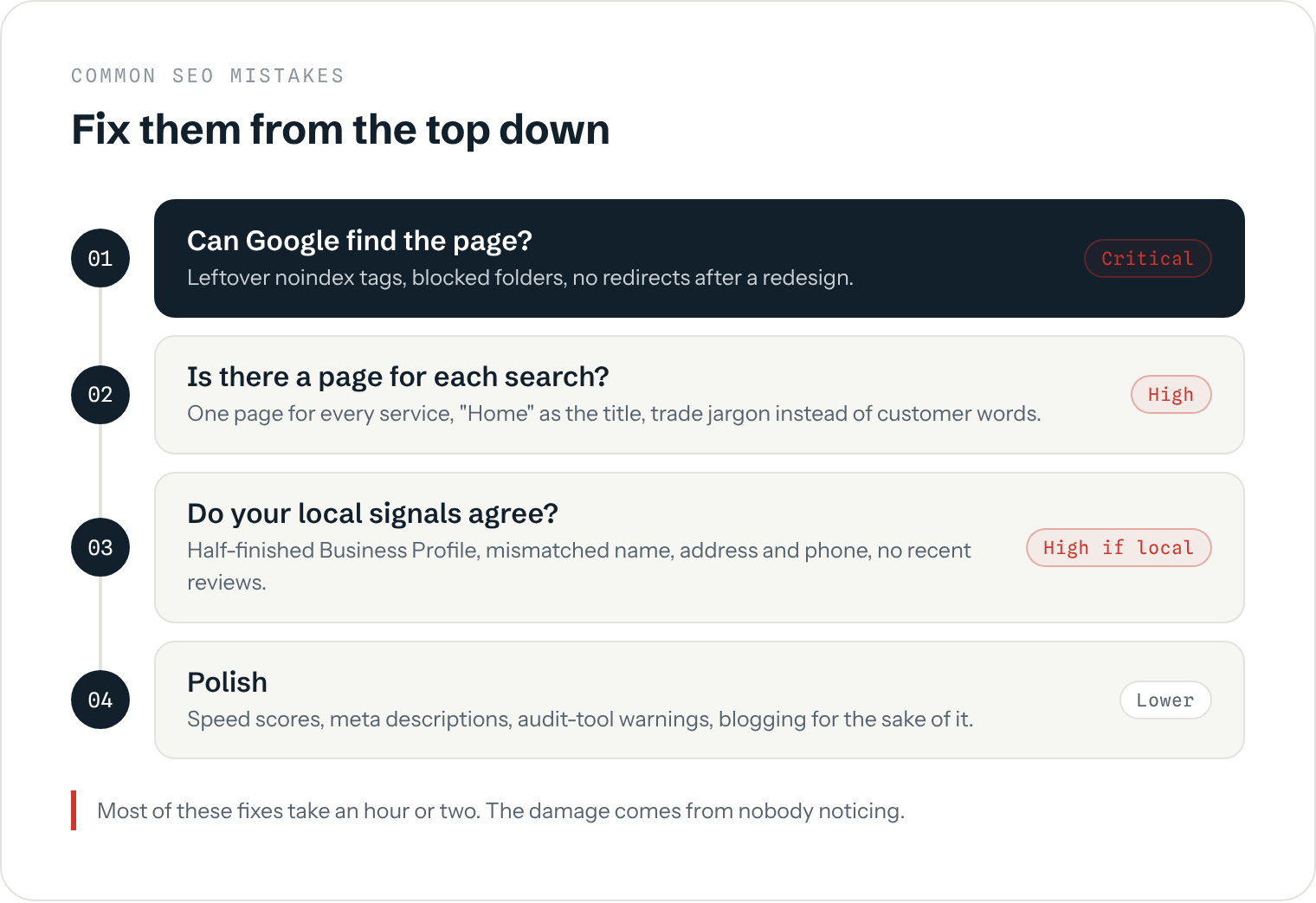
What are the most common SEO mistakes?
These are the ones that turn up again and again when auditing small business websites in South Wales and beyond. The time to fix is a rough estimate for a typical five-to-twenty page site, not a fixed figure.
| Mistake | What it costs you | Usual fix | Time to fix (estimate) |
|---|---|---|---|
| Pages left set to "noindex" or blocked in robots.txt | The page can't appear in Google at all | Remove the tag or rule, then request indexing in Search Console | Under an hour |
| Redesign launched without redirects | Old rankings and links lost overnight | 301 redirect every old URL to its new equivalent | A few hours |
| One page for every service | Ranks for none of them properly | A dedicated page for each main service | A day or two of writing |
| The same title on every page ("Home", the business name) | Google can't tell the pages apart and searchers skip them | A unique title per page naming the service and place | An hour |
| Copy-paste town pages | Seen as doorway pages; rarely rank | Fewer, genuinely local pages, or merge them | A day |
| Business name, address or phone different across the web | Weaker map-pack trust | One exact version everywhere | Half a day |
| No reviews, or none recently | Lower map-pack position and fewer clicks | Ask every customer, with a direct link | Ongoing, minutes a week |
| No Search Console | Problems go unnoticed for months | Verify the site and submit the sitemap | Half an hour |
Notice how cheap most of the fixes are. The damage comes from nobody noticing, not from the work being hard.
Why can't Google find my pages?
This is the mistake that cancels out every other piece of work, so check it first. The usual causes are a "noindex" tag left switched on from when the site was being built (WordPress has a single tickbox for it under Settings, Reading), a robots.txt rule blocking a whole folder, or pages that nothing links to so Google never discovers them. A quick way to see the problem is the Pages report in Google Search Console, which lists pages that aren't indexed and why. Why your website isn't showing on Google walks through each cause and the fix.
Why does a website redesign lose rankings?
Because the old page addresses stop working. If your old "/services/boiler-repair.html" becomes "/boiler-repairs/" on the new site and nobody tells Google, the old page now returns an error. The rankings it had built up, and any links pointing to it from other sites, don't transfer to the new address on their own.
The fix is a 301 (permanent) redirect from every old URL to its closest new equivalent, set up on launch day. Google's guidance on site moves describes the process. Make a list of every old URL before the old site is switched off, because afterwards it's much harder to work out what used to exist. Even done properly, expect a few weeks of wobble in the rankings while Google catches up.
What are the most common on-page SEO mistakes?
- One page for everything. A plumber whose single "Services" page lists boiler repairs, bathroom fitting and drain unblocking will struggle to rank for any of them. Each main service needs its own page that answers what someone searching for it wants to know: what you do, where, roughly what it costs and why you.
- Titles that say nothing. The page title is the blue link in Google's results. "Home" or the business name alone tells neither Google nor the searcher what the page is about. "Boiler Repairs in Newport | Smith Heating" does both.
- Your words, not your customers'. Trade terms ("domestic heating engineer", "residential conveyancing solutions") often aren't what people type. Use the plain phrases customers use on the phone, in your headings and opening lines.
- Worrying about meta descriptions and keywords tags. Google has long said the meta description isn't used for ranking, and it often writes its own snippet from the page instead (see its snippet guidance). A good description can win you the click, so write one for your main pages, but don't spend days on it. The meta keywords tag is ignored entirely.
What are the most common local SEO mistakes?
For a business that serves a local area, these matter as much as the website itself.
- An unclaimed or half-finished Google Business Profile. The wrong primary category, no photos or missing opening hours all hold you back in the map pack. The Google Business Profile guide covers what to fill in.
- A different name, address or phone number in different places. An old address on a directory, a mobile number on one listing and a landline on another. The guide to local citations explains how to tidy them up.
- Not asking for reviews. Most happy customers will leave one if you send them the link the same day. Few will go looking for it. See how to get more Google reviews.
- Twenty town pages with the town name swapped. Google's spam policies call this doorway abuse. A handful of genuinely useful local pages beats dozens of copies; do you need location pages covers where the line is.
Which SEO mistakes can get you penalised?
Most of the mistakes above just hold you back. A few can get pages demoted or removed, and they're nearly always things someone sold you as a shortcut. Google's spam policies list them: buying links or joining link schemes, publishing large amounts of thin or auto-generated content to catch searches, doorway pages, and hidden text. If you've ever paid for "500 backlinks for £49", check the Manual actions report in Search Console. It will say so if Google has taken action against the site.
Cheap SEO packages are where these usually come from, which is one reason how to choose an SEO company spends so long on red flags.
Do site speed and audit-tool scores matter?
Less than the tools suggest. Speed and mobile usability are part of what Google calls page experience, and a site that's painful to use on a phone does lose customers. But Google states that it shows the most relevant page even when its page experience isn't great. A slow page that answers the search will beat a fast page that doesn't.
The same goes for the scores in free audit tools. They flag hundreds of "issues", many of which make no practical difference (a missing alt attribute on a decorative image, a title a few characters too long). Chasing a perfect score is a common way to spend weeks on the wrong things. Use the tools to find the big problems in the first two tiers of the diagram above and ignore most of the rest. Blogging sits in the same tier: worth doing well, but not before the basics (does blogging help SEO? covers when it pays off).
How do you check your own site for SEO mistakes?
- Set up Google Search Console if you haven't already. It's free and it's the only place Google tells you directly what it sees. How to measure SEO success shows which reports to look at.
- Check the Pages report for pages marked "not indexed" that you want in Google.
- Search Google for your main services and town as a customer would. Is there a page of yours that matches each one? If the answer is your homepage for everything, that's the one-page problem.
- Read your page titles in the search results for
site:yourdomain.co.uk. Repeated or empty titles stand out straight away. (The site: search shows a sample, not a full count, so don't read too much into the number.) - Look up your business on Google Maps and two or three directories, and check the name, address and phone match your website exactly.
That covers most of what goes wrong. The technical SEO guide goes further if you're comfortable in the detail, and if you'd rather have someone else check it properly, a fixed-price SEO audit lists every problem on your site in the order worth fixing.
Which mistakes should you fix first?
Work down the diagram at the top: indexing and redirects first, then a proper page for each service, then the local signals, then everything else. A small business that gets the first three tiers right will usually outrank competitors who have spent money on the fourth. One caveat: fixing mistakes removes what's holding you back, but it doesn't win rankings on its own in a competitive market. After the fixes come useful pages and earned links, which is the slower content and links work, and that takes months rather than weeks (how long SEO takes explains why).
Want to know which of these your site has?
A free audit checks your site for the mistakes above and tells you which ones are actually costing you enquiries, in the order worth fixing.
Book a free audit